How to Backup of AD and System State on Server 2008 R2, P-1 - How to Backup of AD and System State on Server 2008 R2, P-2
- Details
- Last Updated: Sunday, 15 March 2015 10:18
- Hits: 8370
Article Index
Steps 9 – When backup has been done you will be see the summary of backup and Log path example –
Summary of backup:
--------------------------
Backup of system state completeed successfully [3/10/2013 11:30 AM]
Log of files successfully backed up
'C:\Windows\Logs\WindowsServerBackup\SystemStateBackup 1/10/2013 02-48-18.log'
Restore Active Directory Backup
For Authoritative Restore of Active Directory follow these steps –
Steps 1 – Restart your Server and press F8 for advance option during startup
Steps 2 – Boot from Directory Services Restore mode.
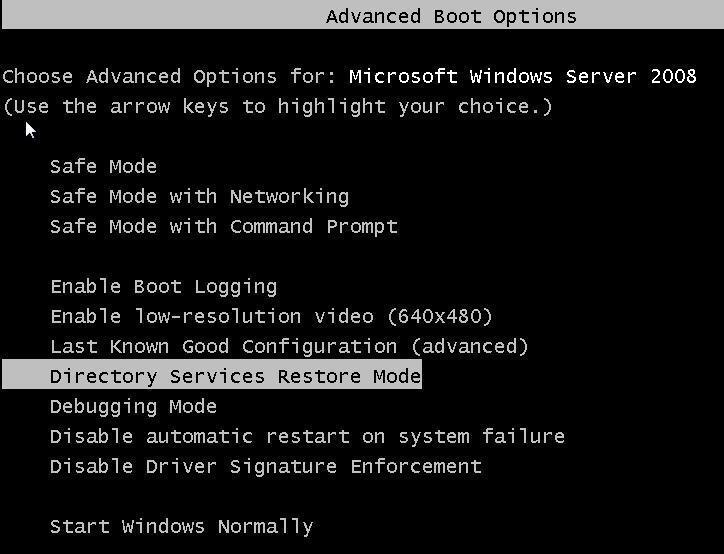
Steps 3 – Login in to your server with Directory Service Restore Mode password which you have already created during Active Directory Installation.
Steps 4 – Now you have to check the version for restore the correct backup
Steps 5 – Open Command Prompt and Type wbadmin get versions and remember your version Identifier. Version will be according to you Backup date and time.
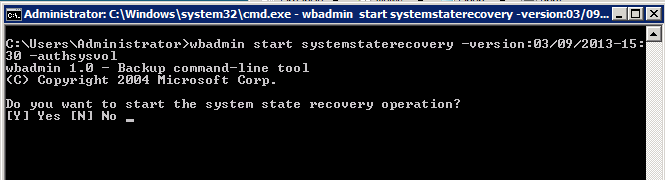
Steps 6 – We need to perform a non-authoritative restore of Active Directory by typing “wbadmin start systemstaterecovery -version:03/09/2013-15:30“
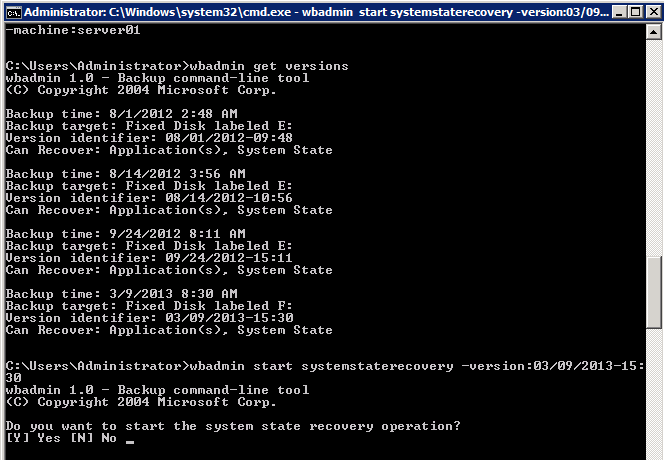
Steps 7 – Press Y to confirm the non-authoritative restore
Steps 8 – You can mark the sysvol as authoritative by adding the–authsysvolswitch to the end of the wbadmin command.